npm은 Node Package Manager의 약자로 node.js에서 사용하는 모듈들을 패키지로 만든 것이다.
npm의 nodemailer를 이용하면 Node.js에서 이메일을 보낼 수 있다.
1) nodemailer를 install 해준다.
- VS CODE에서 Terminal을 실행한 후 본인이 작업하고자 하는 폴더로 들어간다.
- Terminal에서 npm install nodemailer 명령어를 실행해준다.
- 성공적으로 설치되었다면 node_modules와 pacakage-lock.json이 생성된다.
2) 작업파일 생성
- 작업을 하기 위해 test.js라는 이름으로 javascript파일을 만들어주었다.

3) nodemailer 사용
- nodemailer 변수를 만들고 require을 사용하여 우리가 설치했던 nodemailer를 사용할 수 있다.
const nodemailer = require('nodemailer');
4) mailtrap 계정생성
- email을 보내는 프로그램을 만들기 위해서는 SMTP 서버와 메일을 보낼 수 있는 계정정보 필요하다.
우리는 Mailtrap이라는 사이트를 이용할 것이다.
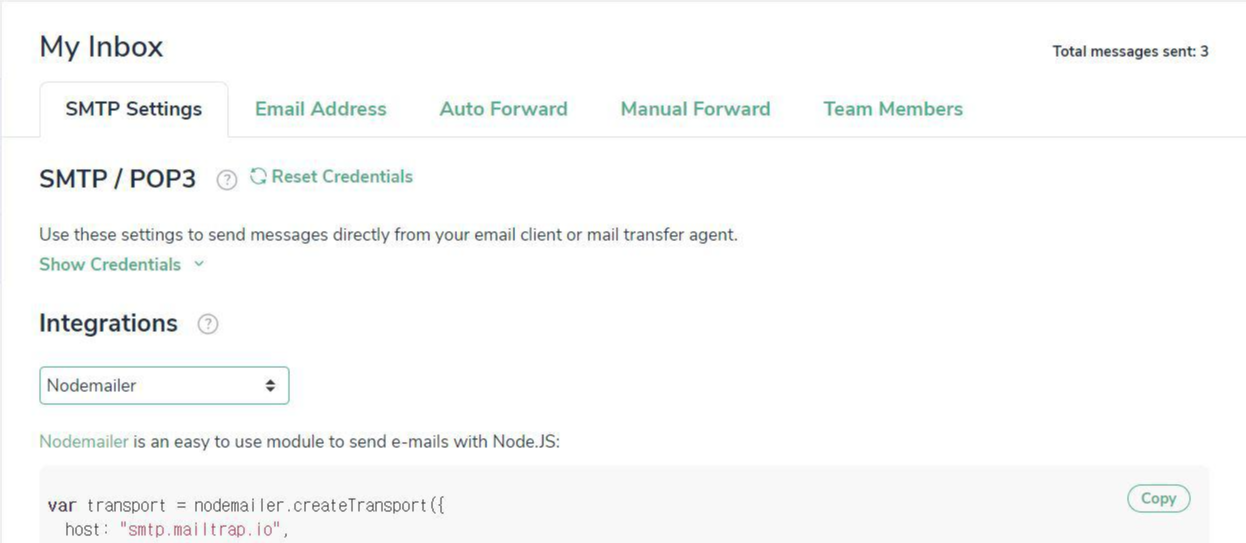
- 가입을 하고 My Inbox - SMTP Settings탭으로 들어간 다음, Integrations에서 Node.js의 nodemailer를 선택하면 해당 메일계정의 정보가 나온다.
이 정보를 복사하여 그대로 사용하면 된다.
5) mail보내기
- 이렇게 email변수에 위에서 받은 계정정보를 넣어준다.
const email = {
    host: "smtp.mailtrap.io",
    port: 2525,
    auth: {
      user: "your user",
      pass: "your pass"
    }
};
- 이후 다음과 같이 이메일을 보내는 로직을 간단하게 구현할 수 있다.
const send = async (option) => {
    nodemailer.createTransport(email).sendMail(option, (error, info) => {
        if(error) {
            console.log(error);
        } else {
            console.log(info);
            return info.response;
        }
    });
};

let email_data = {
    from: "ssrsph@naver.com",
    to: "thsvudghk@gmail.com",
    subject: "hello i'm pyeong hwa son",
    text: "Came here to kill node js"
}

send(email_data);
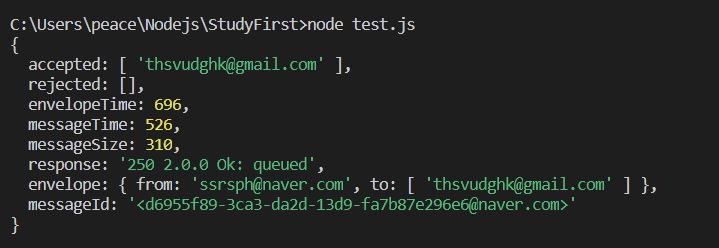
- terminal에서 node test.js명령어로 만든 파일을 실행시키면 다음과 같이 성공적으로 보내진다.
- Mailtrap에 들어가보면 메일이 성공적으로 수신된걸 확인할 수 있다.
